An AI customer service chatbot's realistic job is deflecting the repetitive, well-documented questions — order status, return policy, how a feature works — that make up the bulk of support volume, while escalating anything ambiguous, emotional, or outside its knowledge base to a human quickly. It's not a replacement for a support team; it's a filter that makes the team's time go further.
For the broader "should I use a chatbot or a human" framing, see AI Chatbot vs Live Chat. This article is about making the chatbot itself actually work well once you've decided to build one.
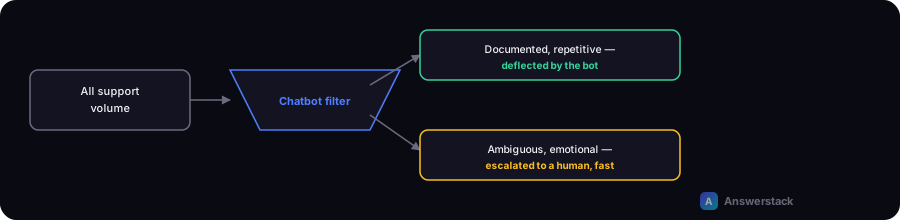
What it should handle
- Documented, repetitive questions — anything with a clear, correct answer already sitting in your help docs, FAQ, or policies (return windows, shipping timelines, how a feature works).
- Order/account status lookups — when connected to your actual systems (not guessing), checking status is a strong, low-risk use case.
- Initial triage — classifying what a request is about and routing it, even if a human handles the actual resolution.
What it should not attempt
- Anything requiring judgment on an exception — a refund outside policy, a complaint that needs de-escalation, anything where "technically against policy but the right call here" applies. Route these to a human immediately, don't let the bot attempt a workaround.
- Emotionally charged interactions — a frustrated or upset customer is poorly served by a bot that can't recognize and appropriately hand off the tone of the conversation.
- Questions with no source of truth in your knowledge base — a bot without grounding (see RAG Chatbots Explained) will guess, and a confident wrong answer about a policy is worse than no answer.
The escalation design that actually matters most
The single highest-leverage design decision in a customer service bot isn't the AI quality — it's how fast and how clearly it recognizes it should hand off. A bot that loops a frustrated customer through three failed attempts before escalating does more damage than one that escalates after one failed attempt. Design explicit escalation triggers:
- Confidence score below a threshold on a knowledge base lookup
- A repeated or rephrased question (signals the first answer didn't help)
- Detected sentiment/frustration signals, if your platform supports this
- An explicit "talk to a person" request — always honor this immediately, never make it hard to find
Measuring whether it's actually helping
Track deflection rate with a quality gate, not deflection rate alone: what percentage of conversations resolve without escalation and don't result in a follow-up contact about the same issue within a few days. A bot that "resolves" conversations by giving up or giving a vague non-answer will show a high raw deflection rate while actually frustrating customers — the follow-up-contact check catches this that a simple resolution-rate metric misses.
A minimal rollout approach
- Start narrow — the 10-15 most common, most clearly-documented questions, not full coverage.
- Ground it in your actual current documentation (see RAG Chatbots Explained), not a static script that goes stale.
- Set explicit, generous escalation triggers — bias toward handing off, not toward the bot attempting everything.
- Review a sample of real conversations weekly for the first month and tighten the knowledge base based on what it got wrong.