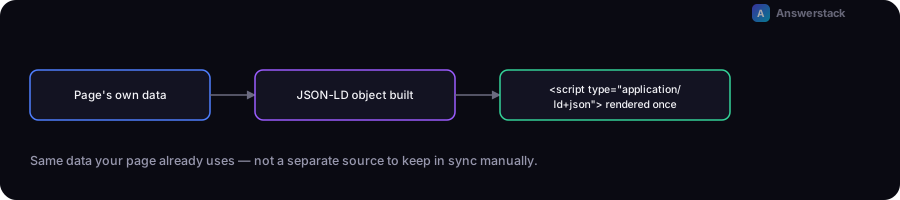
Schema markup in Next.js is a JSON-LD object serialized into a <script type="application/ld+json"> tag, rendered from the same data your page already uses — not a separate content source to keep in sync manually. The implementation pattern is the same whether it's Article, Product, or FAQPage schema: build the object from real page data, render it once per page.
For what schema markup actually does and which types matter, see Schema Markup Explained — this article is the Next.js-specific implementation.
A reusable JSON-LD component
// components/JsonLd.tsx
export function JsonLd({ data }: { data: Record<string, unknown> }) {
  return (
    <script
      type="application/ld+json"
      dangerouslySetInnerHTML={{ __html: JSON.stringify(data) }}
    />
  );
}
dangerouslySetInnerHTML is genuinely appropriate here — JSON-LD has to be raw, unescaped JSON inside the script tag, and React's default text escaping would break it. This is one of the few legitimate uses of that API.
Building the schema object from real page data
// app/blog/[slug]/page.tsx
import { JsonLd } from "@/components/JsonLd";

export default async function BlogPost({ params }: { params: { slug: string } }) {
  const post = await getPost(params.slug);

  const articleSchema = {
    "@context": "https://schema.org",
    "@type": "Article",
    headline: post.title,
    datePublished: post.publishedAt,
    dateModified: post.updatedAt,
    author: { "@type": "Organization", name: "Your Company" },
  };

  return (
    <>
      <JsonLd data={articleSchema} />
      <article>{/* actual visible content */}</article>
    </>
  );
}
The key discipline: post.title, post.publishedAt, and the rest come from the same data object rendering the visible page — there's no separate "schema data" to maintain, which is what keeps it from drifting out of sync with the actual content over time.
Sitewide schema (Organization) vs per-page schema (Article, Product, FAQPage)
Organization schema — your business identity — belongs once, in the root layout, since it applies sitewide:
// app/layout.tsx
const organizationSchema = {
  "@context": "https://schema.org",
  "@type": "Organization",
  name: "Your Company",
  url: "https://example.com",
  logo: "https://example.com/logo.png",
};

export default function RootLayout({ children }: { children: React.ReactNode }) {
  return (
    <html>
      <body>
        <JsonLd data={organizationSchema} />
        {children}
      </body>
    </html>
  );
}
Content-specific schema (Article, Product, FAQPage) belongs on the individual page component, built from that page's actual data, as shown above.
FAQPage schema: only for content that's actually visible as an FAQ
const faqSchema = {
  "@context": "https://schema.org",
  "@type": "FAQPage",
  mainEntity: faqs.map((faq) => ({
    "@type": "Question",
    name: faq.question,
    acceptedAnswer: { "@type": "Answer", text: faq.answer },
  })),
};
Build this from the same faqs array rendering the visible Q&A section on the page — never a hardcoded list disconnected from what's actually displayed, since that mismatch is exactly what search engine guidelines prohibit.
Verifying it's actually correct
After deploying, check the rendered page source (not just the React source) to confirm the script tag outputs valid, complete JSON — a bug in the data-building logic can silently produce undefined or malformed output that only shows up in the rendered HTML, not in development. Validate with a structured data testing tool, then monitor Search Console's enhancement reports over the following weeks.