Schema markup is structured data (typically JSON-LD) added to a page that explicitly labels what things are — this is an Article with this author and this publish date; this is a Product with this price; this is an FAQ with these specific questions and answers. It doesn't directly boost rankings, but it removes ambiguity for search engines and AI systems trying to understand and represent your content, which is what earns rich results and improves citability.
Generate schema for your own content with the Schema Markup Generator — this article covers what it actually does and where it matters most.
What schema markup actually is
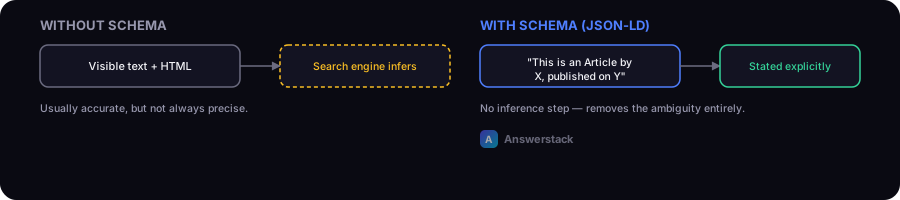
Without structured data, a search engine has to infer what a page is about from its visible text and HTML structure — usually accurate, but not always precise. JSON-LD schema removes the inference step by stating it explicitly:
{
  "@context": "https://schema.org",
  "@type": "Article",
  "headline": "Your Article Title",
  "author": { "@type": "Organization", "name": "Your Company" },
  "datePublished": "2026-08-18"
}
This sits in a <script type="application/ld+json"> tag and isn't visible to human readers — it's purely a machine-readable layer describing the visible content.
What schema markup does and doesn't do
- Doesn't directly improve rankings — schema is not a ranking factor in the way page speed or content quality are.
- Does enable rich results — FAQ dropdowns, star ratings, recipe cards, and other enhanced search result formats generally require the matching schema type to be eligible at all.
- Does help entity and content clarity for AI systems — clear, structured identification of who authored content and what it's about supports the entity-clarity signal covered in Entity SEO Explained and How to Get Cited by AI Search Engines.
The schema types most small business/content sites actually need
| Type | Use for |
|---|---|
| Organization | Your business identity — name, logo, contact info, social profiles. Add once, sitewide. |
| Article | Blog posts and guides — author, publish/update date, headline. |
| FAQPage | Any page with a genuine Q&A section — enables FAQ rich results. |
| Product | E-commerce product pages — price, availability, reviews. |
| BreadcrumbList | Site navigation hierarchy — supports breadcrumb rich results. |
| HowTo | Step-by-step instructional content. |
Most sites don't need every schema type — add the ones that match content you actually have, not a comprehensive set for its own sake.
The most common mistake: schema that doesn't match visible content
Schema markup claiming something the visible page doesn't actually show or support — a rating that isn't displayed anywhere, an FAQ schema for questions not actually answered on the page — violates search engine guidelines and can trigger a manual penalty if detected. The rule is simple: structured data should describe what's genuinely on the page, not what you'd like search engines to think is there.
How to verify it's working
After adding schema, validate it with a structured data testing tool to confirm it parses correctly, then check Search Console's enhancement reports over the following weeks to see whether rich results are actually being granted — validation confirms the markup is well-formed, but eligibility for rich results also depends on factors outside the markup itself (like overall page quality).