React is a JavaScript library for building user interfaces — it renders components, nothing more. Next.js is a framework built on top of React that adds routing, server rendering, data fetching conventions, and a build/deployment pipeline. "React vs Next.js" isn't really a choice between two competitors; it's a question of whether you want to assemble those pieces yourself or use a framework that already has.
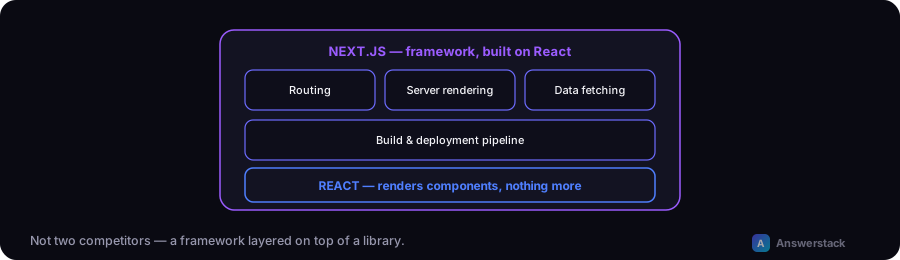
What each one actually is
| React | Next.js | |
|---|---|---|
| What it is | A UI rendering library | A framework built on React |
| Routing | Not included — needs a separate router | Built in (file-based, App Router) |
| Server rendering | Not included by default | Built in (Server Components, SSR, SSG) |
| Data fetching | No opinion — bring your own pattern | Conventions built in (async Server Components, route handlers) |
| Build/deploy tooling | Requires separate setup (bundler, dev server) | Included, optimized for Vercel deployment |
| SEO out of the box | Requires manual work (meta tags, SSR setup) | Built-in metadata API, SSR by default |
Why "just React" usually means React plus several other tools
A production React app that isn't using a framework typically still needs: a router (React Router or similar), a bundler and dev server (Vite or webpack), a data-fetching pattern, and a rendering strategy for SEO if search visibility matters. Next.js bundles equivalents of all of these into one coherent set of conventions — the comparison isn't really "React" vs "Next.js," it's "assemble your own stack around React" vs "use a framework that already assembled one."
When plain React (without a framework) makes sense
- A highly interactive, authenticated-only application where SEO doesn't matter at all (an internal dashboard, a tool behind a login) — server rendering adds little value here.
- A component embedded in an existing non-React page — a widget, not a full application.
- You have very specific architectural requirements a framework's conventions would fight against.
When Next.js is the better default
- Anything public-facing where SEO matters — blogs, marketing sites, e-commerce, content platforms (like this one) benefit directly from built-in server rendering and metadata handling. See Next.js SEO Best Practices.
- You want to ship faster without assembling routing, rendering, and build tooling yourself.
- You're deploying to Vercel (or want to) — the framework and the platform are built by the same team and optimized for each other; see How to Deploy Next.js to Vercel.
- You're building an AI-powered feature that needs both server-side API routes and a fast, interactive frontend — see Building an AI Chatbot Interface With Next.js.
A practical default
For most new public-facing projects in 2026, starting with Next.js rather than assembling plain React plus a router plus a bundler plus a rendering strategy is the more time-efficient choice — you're not giving up React, you're getting React with the common pieces already wired together. Reach for plain React (or a lighter tool like Vite + React) specifically when you've confirmed you don't need what the framework adds — not as a default starting point.