Free tools cover keyword discovery, intent classification, and rough opportunity sizing — enough for most sites' first 20-50 articles. Paid suites earn their cost when you have a specific, recurring question free tools can't answer: precise competitor keyword gaps, backlink-weighted difficulty, or tracking rank movement across hundreds of terms at once.
If you haven't run through the process itself yet, start with Keyword Research: A Practical Process — this article is about which tools to use at each step, not the process.
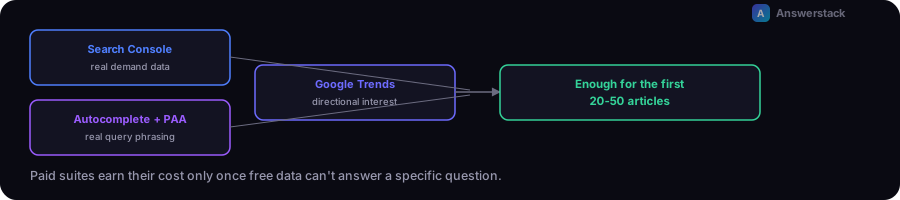
What the free stack actually covers
- Google Search Console — queries you already rank for, including ones you never explicitly targeted. This is real demand data, not an estimate, and it's the single highest-signal free source you have once a site has any traffic history.
- Autocomplete and "People also ask" — real query variations and question phrasing, directly from the search results page.
- Google Trends — directional interest over time and relative comparison between terms, useful for spotting rising vs. declining topics.
- Your own support tickets, sales calls, and chatbot logs — the questions your actual audience asks, which no keyword tool can generate for you (see Keyword Research: A Practical Process step 1).
This stack is enough to build a full topic cluster's worth of article targets, classify intent, and get a directional read on interest.
What free tools genuinely can't do
- Competitor keyword gap analysis — seeing every keyword a competitor ranks for that you don't, at scale, requires a paid suite's index.
- Precise difficulty/volume estimates — free sources give trend direction and rough scale; paid tools model difficulty against backlink profiles and give (still approximate, but more granular) volume numbers.
- Rank tracking across a large keyword set — manually checking rankings for more than a handful of terms doesn't scale; this is where a paid suite's tracking feature earns its cost.
A simple decision table
| Situation | What to use |
|---|---|
| New site, first 10-20 articles | Free stack only |
| Have organic traffic, want to expand from what's already working | Search Console (free) — mine existing query data before buying anything |
| Need to see what a specific competitor ranks for that you don't | Paid suite, even a one-month subscription for a single audit |
| Tracking rank movement weekly across 100+ terms | Paid suite's rank tracker — doing this manually isn't a good use of time |
| Small site, budget-constrained, no specific competitive question yet | Free stack — a paid suite you don't have a specific use for is a recurring cost without a clear return |
See Best SEO Tools: How to Choose for a full breakdown of the specific paid suites (Ahrefs, Semrush, Moz) and technical crawlers, once you've identified a real need for one.
A hybrid workflow that avoids overpaying
- Run the full free-tool process to build your prioritized keyword list and cluster structure.
- Identify the 2-3 specific questions you can't answer with free data — usually competitor gaps or precise difficulty on your shortlist.
- Use a paid tool's free trial or a single month's subscription to answer exactly those questions.
- Cancel or keep the subscription based on whether the recurring value (ongoing rank tracking, regular competitor monitoring) justifies the recurring cost — re-evaluate this every few months, not once and never again.
A common mistake
Subscribing to a paid suite before the content foundation — search intent classification, topic clustering, on-page structure — is solid. A paid tool's competitive intelligence only matters once you're optimizing an already-sound base; used earlier, it mostly produces a longer list of keywords you're not yet equipped to rank for.