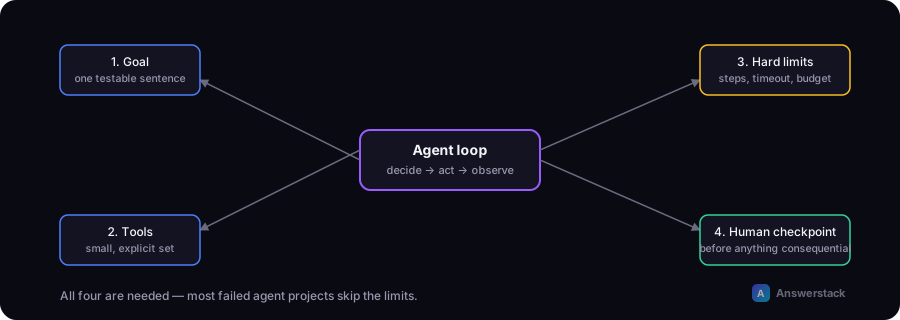
A working AI agent needs four things: a narrow, well-defined goal, an explicit set of tools with clear input/output contracts, hard limits on how far it can run, and a checkpoint before anything consequential happens. Most failed agent projects skip one of these four, usually the limits.
Before building one, confirm you actually need an agent and not a workflow — see AI Agents vs Automation if you haven't made that call yet. This guide assumes you have.
Step 1: Write the goal as a single, testable sentence
"Automate customer support" is not a goal an agent can execute against — it's a department. "Given an incoming support email, determine whether it's a billing question, a bug report, or a general question, and draft a reply using our help docs" is a goal.
If you can't write the goal as one sentence with a clear success condition, narrow it further before writing any code.
Step 2: Define the tool set explicitly
An agent can only do what its tools let it do. For each tool, specify:
- What it does — one job, not a bundle of unrelated capabilities
- Exact input — the parameters the model must supply
- Exact output — what the model gets back, in a predictable format
- What happens on failure — the model needs to see errors, not a silent no-op
Keep the tool count small. An agent with 4-6 well-documented tools is easier to reason about — for the model and for you — than one with 20 loosely related functions. If you're tempted to add a 15th tool, consider whether that capability belongs in a separate, more constrained agent instead.
Step 3: Pick a loop pattern
Most practical agents use some version of: the model sees the goal and available tools, decides on a next action (or decides it's done), the system executes that action and returns the result, and the loop repeats until the model signals completion or a limit is hit.
You don't need a novel architecture for a first build. A simple loop with good tool contracts outperforms a clever loop with vague ones.
Step 4: Add hard limits before the first real run
This is the step that gets skipped, and it's the one that causes runaway cost and unpredictable behavior in production. At minimum:
| Limit | Why |
|---|---|
| Max tool calls per run | Caps runaway loops and cost per request |
| Timeout | Caps wall-clock time regardless of tool-call count |
| Budget cap (token/cost) | A hard stop independent of step count, in case individual calls are expensive |
| Forbidden actions list | Explicit denial for anything irreversible (sending money, deleting data, emailing a customer) unless a human approves it |
None of these require sophisticated infrastructure — a counter and an if-statement covers the first three.
Step 5: Put a human between the agent and anything consequential
For any action with real-world consequences — sending an email, issuing a refund, modifying a customer record — the agent should produce a proposed action, not execute it directly, until you have enough production data to trust it unsupervised. This is the same human-in-the-loop principle covered in How to Build an AI Business Workflow, and it applies more, not less, to agents — their action sequence is less predictable than a fixed workflow's.
Step 6: Log every tool call
You will need to debug this. Log the full sequence: what the model decided, what tool it called with what input, what came back, and what it decided next. Without this trace, "the agent did something wrong" is nearly impossible to diagnose — you're debugging a reasoning process, not a stack trace.
A minimal worked example
Goal: "Given a support email, classify it as billing, bug report, or general, and draft a reply from the knowledge base."
Tools: search_knowledge_base(query), classify_intent(text), draft_reply(intent, context).
Limits: max 5 tool calls, 30-second timeout, no tool that sends anything — the draft goes to a human review queue.
Loop: classify → search knowledge base for relevant docs → draft a reply → stop. Three tool calls in the common case, well inside the 5-call limit, with a clear failure mode if the knowledge base search comes back empty (draft a "needs human review" flag instead of guessing).
Common mistakes
- No step limit, discovered only after a bill spikes from a loop that kept "researching."
- Too many tools, which increases the chance the model picks the wrong one or misuses a parameter.
- No evaluation set — a handful of real, representative inputs you test against before every change, so you can tell if a prompt or tool change made things better or worse.
- Skipping the human checkpoint because the demo worked fine — demos don't have adversarial or malformed inputs; production does.