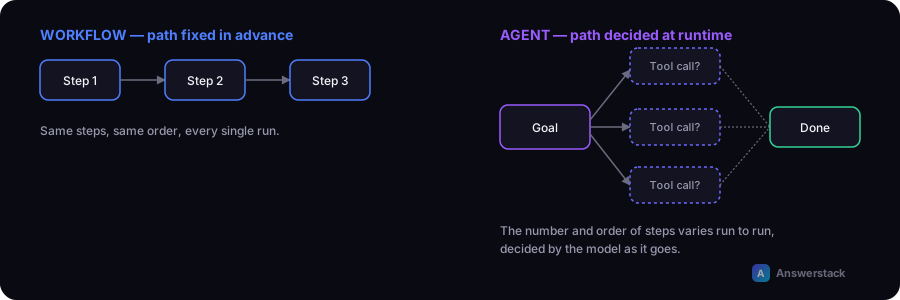
An automation workflow executes a fixed sequence of steps you defined in advance. An AI agent is given a goal and a set of tools, and decides which steps to take, and in what order, to reach it. Agents trade predictability for flexibility.
The key distinction
In a workflow (with or without AI steps inside it), you design the sequence: step 1, then step 2, then step 3. The AI, if present, does one job within a step you control.
In an agent system, you describe a goal and give the model access to tools (a search function, a database query, an API call, a code execution environment). The model decides, at runtime, which tools to call, in what order, and when it's done. The path isn't fixed in advance — the agent plans it.
Side-by-side
| Workflow / automation | AI agent | |
|---|---|---|
| Who defines the steps | You, in advance | The model, at runtime |
| Predictability | High — same path every time | Lower — path can vary run to run |
| Best for | Known, repeatable processes | Open-ended tasks with multiple valid paths |
| Debugging | Trace the fixed sequence | Trace the agent's reasoning/tool-call log |
| Risk profile | Contained — limited to defined actions | Higher — agent can take unexpected action sequences |
| Typical use | Ticket routing, data entry, reporting | Research tasks, multi-step troubleshooting, complex Q&A over tools |
A simple example of each
Workflow: "When a new lead form is submitted, look up the company in Clearbit, score it, and post to Slack if the score is above 70." Fixed sequence, same every time.
Agent: "Research this company and tell me if they're a good fit for our product." The agent might decide to search the web, check their careers page, look at recent funding news, and check your CRM for prior contact — in whatever order it determines is useful, and it might do more or fewer steps depending on what it finds.
Why most businesses should start with workflows, not agents
Agents are more flexible, but that flexibility comes with real costs:
- Unpredictable runtime and cost — an agent might take 2 tool calls or 20 depending on the task.
- Harder to guarantee correctness — more autonomy means more surface area for a wrong turn.
- Harder to debug — you're reviewing a reasoning trace, not a fixed diagram.
For the vast majority of business processes — ticket routing, data extraction, lead scoring, report generation — a well-designed workflow with one or two AI steps (see How to Build an AI Business Workflow) is more reliable, cheaper, and easier to maintain than an agent.
When an agent is actually the right tool
- The task genuinely has an unknown number of steps (open-ended research, multi-hop troubleshooting).
- The value of flexibility outweighs the cost of unpredictability.
- You can afford to add guardrails: a maximum number of tool calls, a budget cap, and a human review step before any consequential action (sending money, deleting data, contacting a customer).
A practical middle ground
Many production systems use a constrained agent: a small, fixed set of tools, a capped number of steps, and a workflow wrapper that validates the final output before acting. This gets some of the flexibility of an agent without the fully open-ended risk.