Building an AI business workflow reliably comes down to five stages: map the process, isolate the AI step, design guardrails, build and test, then monitor in production. Skipping the mapping stage is the most common reason AI automations fail.
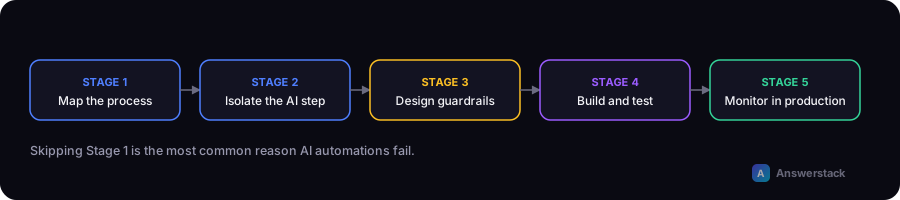
Stage 1: Map the process as it exists today
Before opening any automation tool, write down the process exactly as a human currently does it — every step, every decision point, every exception. Include:
- What triggers the process (an email arrives, a form is submitted, a schedule fires)
- Every branch and exception you can remember from the last 3 months
- Where the process currently breaks or gets stuck
- What "done" looks like
If you can't describe the process clearly on paper, you can't automate it reliably — with or without AI.
Stage 2: Isolate the step(s) that actually need AI
Go through your process map and mark each step as either:
- Deterministic — a rule can handle this (fetch data, format a value, send an email, update a field)
- Judgment-based — this step requires interpreting meaning, tone, or unstructured content
Most workflows have only one or two judgment-based steps. Everything else should stay deterministic — see AI Automation vs Traditional Automation for the reasoning.
Stage 3: Design guardrails before you build
For each AI step, define upfront:
- Input boundaries — what happens if the input is empty, malformed, or in an unexpected language?
- Confidence threshold — below what confidence does this route to a human instead of acting automatically?
- Output constraints — should the AI only choose from a fixed list of categories, or can it generate free text? Constrained outputs are easier to validate.
- Failure behavior — if the AI step errors out, does the workflow retry, skip, or halt and alert someone?
This stage is what separates a demo from something safe to run unattended.
Stage 4: Build and test
A minimal, common architecture:
1. Trigger        (webhook, schedule, form submission, inbox rule)
2. Prepare input   (clean text, fetch related data)
3. AI step         (classify / extract / draft — one clear job, not five)
4. Validate output (does it match expected format/categories?)
5. Decision rule   (confidence high enough? route automatically vs. flag for review)
6. Action          (update system, send message, notify human)
7. Log             (store input, output, and decision for later review)
Testing tips specific to AI steps:
- Build a test set of real historical examples, including edge cases and past failures.
- Test with intentionally messy input (typos, missing fields, different languages if relevant).
- Don't test for exact string matches on generated text — test for structural correctness (right category, required fields present, length within range).
Stage 5: Monitor in production
AI steps drift in ways rules don't — model updates, changing input patterns, and edge cases you didn't anticipate all affect output quality over time. At minimum, track:
- Human override rate — how often does a person correct or reject the AI's output? Rising override rate is an early warning sign.
- Confidence distribution — is the model becoming less certain over time on the same type of input?
- Cost per run — usage-based AI costs can creep up as volume grows.
- Time saved vs. baseline — revisit your original ROI estimate with real numbers.
A worked example: invoice processing
- Map: Invoices arrive by email → someone opens the PDF → manually enters vendor, amount, due date into accounting software → files the PDF.
- Isolate: Extracting vendor/amount/due date from an unstructured PDF is the judgment step. Filing and data entry are deterministic once extracted.
- Guardrails: If extraction confidence is low, or the amount exceeds a threshold, route to a human for review instead of auto-entering.
- Build: Email trigger → PDF text extraction → AI extracts structured fields → validate fields are present and amount is numeric → auto-enter if confident, else flag.
- Monitor: Track how often a human has to correct an extracted field; tune the confidence threshold based on that data.