A workflow template needs three things to actually be usable: a specific trigger, a small number of steps in a defined order, and a clearly placed human review checkpoint for anything consequential. The five templates below follow that structure — adapt the steps to your actual apps and data, but keep the shape.
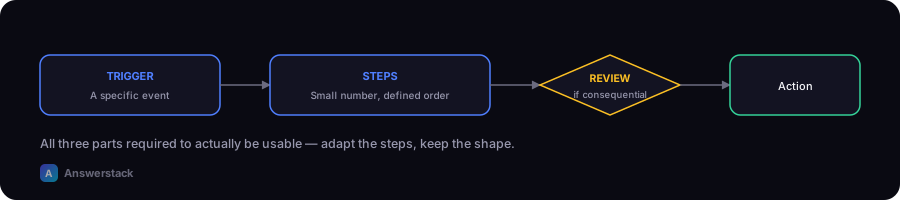
Build any of these out with the AI Workflow Planner to get a visual diagram with review checkpoints placed automatically. For the underlying structural patterns these templates draw from, see AI Workflow Patterns.
1. Support ticket triage
Trigger: New support ticket
  → Classify intent (billing, bug, general question)
  → Search knowledge base for a relevant answer
  → [High confidence] Draft reply, send to human for one-click approval
  → [Low confidence] Route to human agent directly, no draft
Why the checkpoint is placed there: a wrong classification is recoverable (a human just re-routes it), but a wrong reply sent to a customer isn't — so the review sits before sending, not before classifying.
2. Lead qualification and routing
Trigger: New form submission or inbound lead
  → Extract company size, budget signal, and stated need
  → Score against your ICP criteria
  → [Score above threshold] Route to sales, notify via Slack/email
  → [Score below threshold] Add to nurture sequence, no human touch needed
Why the checkpoint is placed there: low-scoring leads routing to a nurture sequence is low-stakes and reversible, so no human review is needed there — the design choice is where to skip the checkpoint, not just where to add one.
3. Meeting and call summaries into CRM
Trigger: Call recording or transcript available
  → Generate summary and action items
  → Extract structured fields (next steps, deal stage signal)
  → Push to CRM as a draft note
  → Human confirms or edits before it's marked final
Why the checkpoint is placed there: CRM data quality compounds — a bad auto-generated note that's never reviewed pollutes every future report that reads from it, so a lightweight confirm step (not a full rewrite) is worth the small friction.
4. Invoice or document data extraction
Trigger: New invoice/document uploaded
  → Extract key fields (amount, vendor, date, line items)
  → Check extracted amount against a confidence score and a threshold
  → [High confidence, under threshold] Auto-enter into accounting system
  → [Low confidence, or over threshold] Route to human for verification
Why the checkpoint is placed there: this is the clearest financial-risk case — the threshold-based split means routine, low-value invoices move fast while anything large or uncertain gets a human's eyes before it touches accounting.
5. Content and reporting drafts
Trigger: Scheduled (weekly) or data threshold reached
  → Pull raw data (analytics, sales numbers, support volume)
  → Draft summary in your standard report format
  → Human reviews and edits before distribution
Why the checkpoint is placed there: the risk here isn't financial or customer-facing, it's accuracy and tone — a human pass before anything goes to a wider audience is cheap insurance against a misread number or an off-brand summary.
Adapting these to your actual tools
Each template names steps, not specific software — the same "classify → search → draft → review" shape works whether you build it in a no-code platform, a self-hosted engine, or a custom API integration (see Best AI Automation Platforms: How to Choose for picking the underlying platform). The template is the design; the platform is the implementation detail.