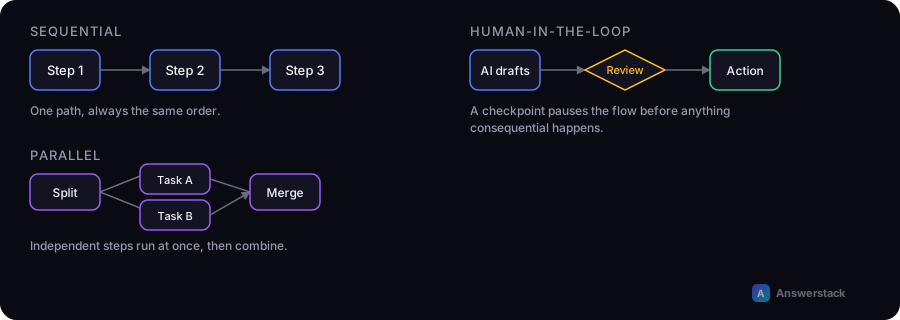
Most AI-powered business workflows fit one of three structural patterns: sequential (steps run one after another), parallel (independent steps run at the same time), and human-in-the-loop (an AI step pauses for human review before continuing). Picking the right pattern up front avoids rebuilding the workflow later.
Pattern 1: Sequential
Each step depends on the output of the previous one. This is the default pattern and the easiest to reason about and debug.
Trigger → Step A → Step B → Step C → Action
Example: A support ticket arrives → classify intent → look up the customer record → draft a reply using both → send for review.
Use sequential when each step genuinely needs the previous step's output. Don't force a sequential structure on steps that don't actually depend on each other — it just adds latency.
Pattern 2: Parallel
Independent steps run at the same time and their results are combined afterward.
              ┌→ Step A ┐
Trigger →     ├→ Step B ┤ → Combine → Action
              └→ Step C ┘
Example: A new lead arrives → simultaneously (1) look up company info, (2) score against your ICP criteria, (3) check for prior contact history → combine all three into a single lead record.
Use parallel when steps are independent and latency matters — running three 2-second lookups in parallel takes 2 seconds total instead of 6.
Pattern 3: Human-in-the-loop
An AI step produces a result, but the workflow pauses for a human decision before taking a consequential action.
Trigger → AI step → Confidence check → [High confidence: auto-proceed]
                                      → [Low confidence: human review] → Action
Example: An AI step extracts an invoice amount → if confidence is high and the amount is under a threshold, auto-enter it → if confidence is low or the amount is large, route to a human for approval first.
Use human-in-the-loop for anything financial, customer-facing, or hard to reverse — see How to Build an AI Business Workflow for how to set the confidence threshold.
Combining patterns
Real workflows usually combine all three. A common shape:
Trigger
  → Parallel: gather context from multiple sources
  → Sequential: classify → draft → validate
  → Human-in-the-loop: review if confidence is low
  → Action
Choosing a pattern for a new workflow
Ask, for each step:
- Does this step need the output of a previous step? If yes, it's sequential relative to that step.
- Could this step run independently of others at the same stage? If yes, consider running it in parallel to reduce latency.
- Is a wrong output here costly or hard to reverse? If yes, add a human-in-the-loop checkpoint before the consequential action, not after.
A common mistake
Defaulting everything to sequential "to keep it simple" often just makes workflows slower for no reliability benefit — independent lookups don't need to wait on each other. Conversely, skipping human-in-the-loop checkpoints to make a workflow "fully automated" is the most common cause of costly AI automation failures; see AI Automation Mistakes.