There's no single "best" AI automation platform — the right choice depends on your team's technical capacity, expected volume, and how much control you need over the AI steps. This guide walks through the main categories and how to evaluate within each.
A note before we start: we have not run controlled, hands-on tests of every platform named below, and pricing/features in this space change frequently. Treat this as a starting framework for your own evaluation, not a ranked scorecard — see our editorial policy and affiliate disclosure for how we handle tool coverage.
Start with this question: how much technical capacity do you have?
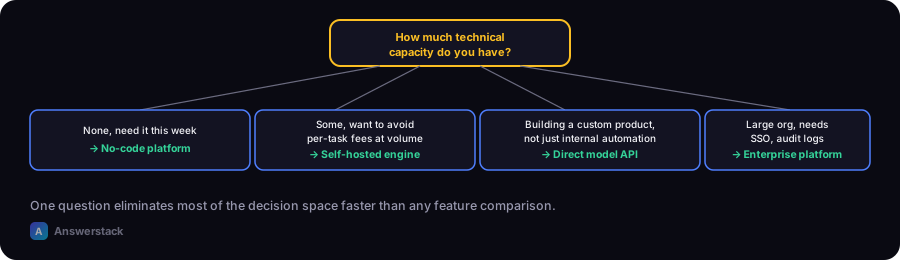
This one question eliminates most of the decision space faster than any feature comparison.
| Your situation | Category to start with |
|---|---|
| No developers, need something running this week | No-code visual automation platform |
| Some technical capacity, want to avoid per-task fees at volume | Self-hosted / open-source workflow engine |
| Building a custom product experience, not just internal automation | Direct model API + custom backend |
| Large org, need SSO, audit logs, compliance | Enterprise automation platform |
No-code visual automation platforms
What they're for: connecting your existing business apps (CRM, email, spreadsheets, forms) with visual trigger-and-action workflows, with AI steps available as one action type among many.
Well-known examples: Zapier and Make are the two most widely used general-purpose platforms in this category; both connect to thousands of common business apps and support AI steps (text generation, classification) as part of a broader workflow.
What to actually check before choosing:
- Pricing model — usually per-task/per-run, which can scale faster than expected at volume
- Whether the apps you actually use are supported natively (vs. requiring a generic webhook workaround)
- How much control you get over the AI step's prompt/instructions
Best fit: your first automation project, or ongoing internal automations where per-task cost stays predictable at your volume.
Self-hosted / open-source workflow engines
What they're for: the same orchestration concept as no-code platforms, but you run the engine yourself, trading setup effort for full control and no per-task platform fee.
Well-known example: n8n is the most widely used open-source option in this category, offering both self-hosted and hosted-cloud versions.
What to actually check before choosing:
- Whether your team can handle hosting, updates, and uptime (or whether you'll use a hosted version of the open-source tool)
- Whether the built-in integrations cover what you need, or whether you'll be writing custom code for gaps
Best fit: teams with some technical capacity, or businesses whose automation volume has grown enough that per-task platform fees are becoming a real cost line.
Direct model provider APIs (building custom)
What they're for: when you're not automating an internal process but building a product feature — a branded chatbot, an AI-powered tool on your own site — where you need full control over the interface and logic.
What to actually check before choosing:
- Usage-based pricing per token/request, and whether it fits your expected volume (use the AI Automation ROI Calculator)
- Data handling and retention policies, especially for sensitive input
- Your team's ability to build and maintain the surrounding application — see Building APIs for AI Applications
Best fit: teams building a custom-facing AI product rather than automating an internal workflow.
A practical decision path
- Is this an internal process, or a customer-facing product feature? Internal → start with no-code or open-source. Product feature → direct API + custom build.
- Do you have any technical capacity in-house? None → no-code platform. Some → open-source becomes viable once volume justifies it.
- What's your realistic monthly volume? Low volume → per-task pricing on a no-code platform is fine. High volume → the math often favors a self-hosted engine or direct API integration.