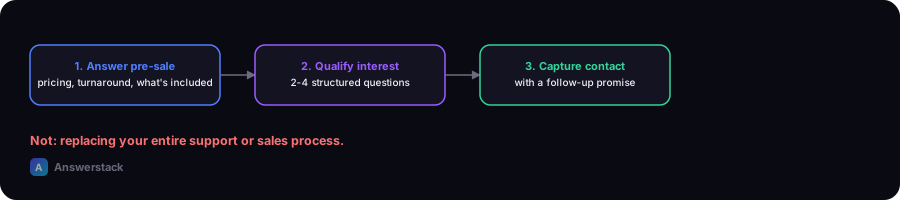
For most small businesses, an AI chatbot's biggest realistic win is capturing and qualifying leads outside business hours and answering repetitive pre-sale questions — not replacing your entire support or sales process.
What a small business chatbot should actually do
Keep the scope narrow and specific:
- Answer top pre-sale questions — pricing structure, what's included, how it works, turnaround time.
- Qualify inbound interest — ask 2–4 structured questions (budget range, timeline, need) before routing to a human.
- Capture contact info when a human isn't available, with a clear promise of when you'll follow up.
- Book or route — schedule a call, or route to the right person/team based on the answers.
Resist the urge to make it "handle everything." A narrow, well-grounded bot outperforms a broad, thin one.
Are you ready for one?
You're a good fit if:
- You get the same 5–10 questions repeatedly via email or your contact form
- You lose leads because you can't respond fast enough outside business hours
- You already have decent documentation (FAQ, pricing page, service descriptions) to ground it in
You're probably not ready if:
- Your offering changes so often that a knowledge base would be out of date within days
- You have very low inbound volume (a chatbot won't outperform a well-written FAQ page and a fast email reply)
- You don't have anyone available to review conversations and improve the bot after launch
Realistic cost expectations
Three components make up the cost:
- Setup — a few hours to a few days depending on whether you use a no-code platform or build custom.
- Ongoing platform/API cost — usage-based, generally low at small-business conversation volumes. Use the AI Chatbot Cost Calculator with your actual visitor numbers for a real estimate.
- Maintenance — periodically reviewing real conversations and updating the knowledge base, especially after launch.
A simple 2-week rollout plan
Week 1
- Pull your top 20 recurring questions from email/support history
- Write clear, direct answers for each
- Choose a no-code platform (fastest path for most small businesses) and configure it with this content
Week 2
- Add 3–4 qualifying questions for lead capture
- Set the escalation rule (e.g., "book a call" button always visible; hand off after 2 unclear replies)
- Test with the real questions from week 1, plus a few off-topic ones
- Launch to a small percentage of traffic first if your platform supports it, then roll out fully
Measuring success
Track weekly for the first month:
- Conversations started vs. leads captured
- How often the bot escalates or fails to answer (aim to shrink this over time by improving its knowledge base)
- Follow-up response time on captured leads