An AI chatbot is a conversational interface powered by a language model that interprets free-text input and generates a relevant response, rather than matching input against a fixed decision tree of pre-written rules.
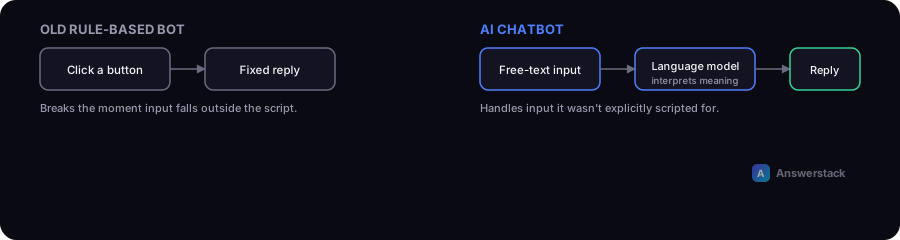
Rule-based bots vs AI chatbots
Older "chatbots" were decision trees: click a button, get a fixed reply, click another button. They work fine for narrow, predictable flows but break the moment a user types something outside the expected script.
AI chatbots, built on large language models (LLMs), can:
- Understand phrasing they weren't explicitly programmed for
- Hold context across a multi-turn conversation
- Generate a natural-language response rather than selecting from a fixed list
- Pull in outside information via retrieval (see RAG Chatbots Explained) to answer based on your actual content
The basic architecture
A typical AI chatbot has four layers:
- Interface — the chat widget on your website, or a messaging platform integration.
- Orchestration — the logic that manages conversation state, decides when to call the model, and when to call other systems (a database lookup, a booking API).
- Model — the LLM generating responses, usually accessed via an API.
- Knowledge source — your documentation, FAQ, or database, retrieved and given to the model as context so it answers accurately instead of guessing (this is what makes a chatbot "know" your business).
Without step 4, a chatbot will answer generically or, worse, confidently make things up — see AI Chatbot Security for why that matters.
What AI chatbots are commonly used for
- Website support — answering common questions instantly, deflecting simple tickets from human agents.
- Lead qualification — asking a few structured questions and routing qualified leads to sales (see AI Chatbots for Lead Generation).
- Internal knowledge search — employees asking questions against internal docs instead of searching a wiki.
- Guided workflows — booking, troubleshooting steps, order status lookups.
What they're not good at (yet)
- High-stakes decisions without human review — refund approvals, legal or medical advice, anything with real financial or safety consequences.
- Perfect accuracy on niche or rapidly changing information unless connected to a live, well-maintained knowledge source.
- Long, highly technical troubleshooting without either escalation to a human or deep tool integration.
Cost basics
Costs generally come from three places: the AI model API (usage-based, per message/token), the hosting/orchestration platform, and setup/maintenance time. For a realistic monthly estimate based on your traffic, use the AI Chatbot Cost Calculator.
How to evaluate if you need one
You likely benefit from an AI chatbot if:
- You get repetitive questions your team answers manually, over and over
- Your support or sales team is a bottleneck for simple, answerable questions
- You have documentation good enough to ground accurate answers
You probably don't need one yet if:
- Your support volume is low enough that a simple contact form is faster to build and maintain
- You don't have documented answers to ground it in (a chatbot with no knowledge source will guess)