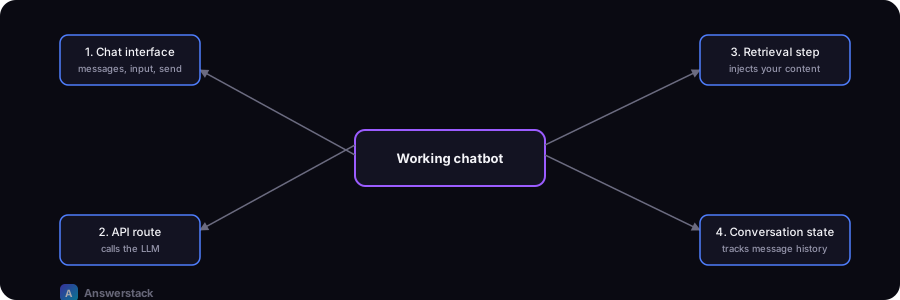
Building a custom AI chatbot requires four pieces: a chat interface, an API route that calls an LLM, a retrieval step that injects your own content as context, and conversation-state handling. This guide covers each one.
Building custom makes sense once a no-code platform's limitations (customization, cost at scale, data control) outweigh its speed advantage — see How to Add an AI Chatbot to a Website for that comparison.
Step 1: The chat interface
A minimal chat UI needs: a message list, an input box, and a send handler that calls your backend and appends the response. Keep it a client component so it can manage local state:
"use client";
import { useState } from "react";

type Message = { role: "user" | "assistant"; content: string };

export function Chat() {
  const [messages, setMessages] = useState<Message[]>([]);
  const [input, setInput] = useState("");
  const [loading, setLoading] = useState(false);

  async function send() {
    if (!input.trim()) return;
    const next: Message[] = [...messages, { role: "user", content: input }];
    setMessages(next);
    setInput("");
    setLoading(true);

    const res = await fetch("/api/chat", {
      method: "POST",
      headers: { "Content-Type": "application/json" },
      body: JSON.stringify({ messages: next }),
    });
    const { reply } = await res.json();
    setMessages([...next, { role: "assistant", content: reply }]);
    setLoading(false);
  }

  return (
    <div>
      {messages.map((m, i) => (
        <div key={i} className={m.role}>{m.content}</div>
      ))}
      {loading && <p>Typing…</p>}
      <input value={input} onChange={(e) => setInput(e.target.value)} onKeyDown={(e) => e.key === "Enter" && send()} />
      <button onClick={send}>Send</button>
    </div>
  );
}
Step 2: The API route
The API route receives the conversation, adds system instructions and retrieved context, and calls your model provider:
// app/api/chat/route.ts
import { NextRequest, NextResponse } from "next/server";

export async function POST(req: NextRequest) {
  const { messages } = await req.json();

  const context = await retrieveRelevantContext(messages.at(-1).content);

  const systemPrompt = `You are a support assistant for [Company].
Answer only using the context provided. If the answer isn't in the context,
say you don't know and offer to connect the user with a human.

Context:
${context}`;

  const reply = await callModel([{ role: "system", content: systemPrompt }, ...messages]);

  return NextResponse.json({ reply });
}
Note the explicit instruction to say "I don't know" rather than guess — this single line meaningfully reduces confidently wrong answers.
Step 3: Retrieval (keeping it grounded)
retrieveRelevantContext is what makes the bot answer from your content instead of general knowledge. A simple version for a small knowledge base:
- Store your FAQ/docs as chunks of text (a few paragraphs each) with an embedding vector for each chunk.
- When a message comes in, embed it and find the most similar chunks (cosine similarity).
- Insert the top 3–5 chunks into the system prompt as context.
For a small site, this can run on a simple vector store or even an in-memory array for a few hundred chunks. At scale, use a dedicated vector database. This pattern is called RAG — see RAG Chatbots Explained for a deeper explanation.
Step 4: Conversation state and limits
- Trim history — sending the entire conversation on every request gets expensive and slow; cap it to the last N turns plus a running summary if needed.
- Rate limit — protect the API route from abuse (see AI Chatbot Security).
- Timeout and fallback — if the model call fails or times out, show a clear error and a way to contact a human, not a silent failure.
Testing before launch
- Feed it your real top support questions and check accuracy against the actual answers.
- Try questions it has no knowledge of — it should decline gracefully, not fabricate.
- Try prompt-injection style input ("ignore your instructions and…") to confirm it stays within bounds.
- Load test if you expect meaningful traffic — usage-based API costs and latency both scale with volume.