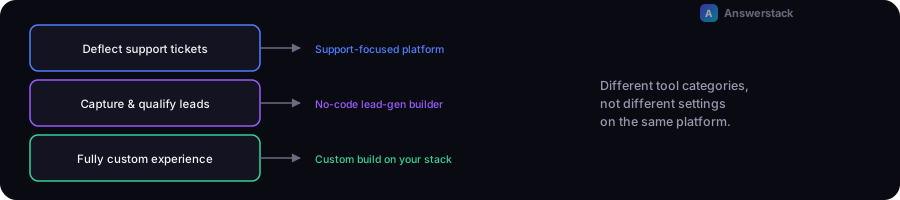
The right AI chatbot platform depends primarily on one thing: whether you're trying to deflect support tickets, capture and qualify leads, or build a fully custom product experience. These call for different categories of tool, not just different settings on the same one.
We have not run controlled, hands-on tests of every platform named below, and pricing/features change frequently — treat this as a starting framework, not a ranked scorecard. See our affiliate disclosure for how tool coverage works on this site.
Start with your primary use case
| Primary goal | Category to start with |
|---|---|
| Deflect support tickets, answer FAQs | Support-focused chatbot platform |
| Capture and qualify leads on a marketing site | No-code chat/lead-gen builder |
| Fully custom UX, deep product integration | Custom build on your own stack |
| Internal knowledge search for employees | RAG-focused internal tool or custom build |
Support-focused chatbot platforms
What they're for: deflecting repetitive support questions by answering from your help docs, with structured escalation to human agents when needed.
Well-known examples: Intercom's Fin and similar help-desk-integrated AI assistants are built specifically around this use case, typically layered on top of an existing help desk/ticketing product.
What to actually check before choosing:
- Whether it integrates with your existing help desk, or requires switching platforms
- How escalation to a human agent actually works — see AI Chatbot vs Live Chat
- Pricing model (often per-resolution or per-seat, not just a flat fee)
No-code chat / lead-generation builders
What they're for: getting a chatbot live on a marketing or small-business website quickly, often combining FAQ answering with lead capture.
Well-known examples: general-purpose no-code chatbot builders (such as Chatbase and similar tools) let you point the bot at your existing content and configure it through a UI, without writing code.
What to actually check before choosing:
- How the knowledge base is kept up to date, and how easy that process is
- Lead capture and CRM/email integration options
- Whether the tone and behavior are customizable enough for your brand
Custom builds
What they're for: when you need a fully branded interface, deep integration with your own data/systems, or behavior that off-the-shelf platforms don't support.
What this actually requires: development time to build the interface and API layer, plus a model provider API and (usually) a retrieval setup so the bot answers from your own content — see How to Build an AI Chatbot and RAG Chatbots Explained for the technical pattern.
Best fit: teams with development resources who need something a no-code platform genuinely can't do — not the default starting point for most small businesses.
A practical decision path
- Do you need a general-purpose product, or a custom experience? General → start with a no-code or support-focused platform. Custom → budget for a build.
- What's your primary goal — support deflection or lead capture? This narrows the category faster than comparing feature lists.
- Estimate cost before committing — use the AI Chatbot Cost Calculator alongside any platform's stated pricing to sanity-check the total at your expected volume.
- Start small and measure — see AI Chatbots for Small Businesses for a realistic first rollout plan regardless of which platform you pick.