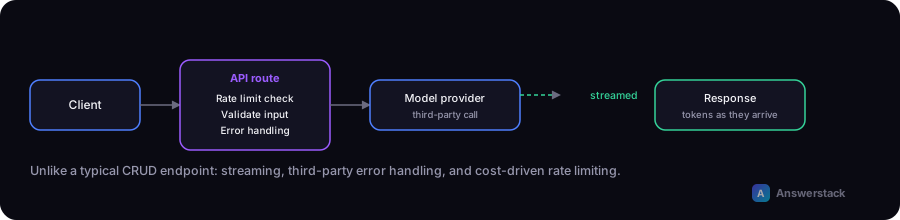
API routes for AI features have a few needs that typical CRUD endpoints don't: streaming responses, careful error handling around a third-party model call, and rate limiting to control usage-based cost. Here's how to structure one in Next.js.
The basic shape
Most AI feature endpoints — a chatbot, a content generator, a classifier — follow the same request/response shape regardless of what they do internally:
// app/api/[feature]/route.ts
import { NextRequest, NextResponse } from "next/server";

export async function POST(req: NextRequest) {
  const body = await req.json();

  // 1. Validate input
  if (!body.input || typeof body.input !== "string") {
    return NextResponse.json({ error: "Missing input" }, { status: 400 });
  }

  // 2. Rate limit (see below)
  // 3. Call the model provider
  // 4. Return the result (or stream it)

  const result = await callModel(body.input);
  return NextResponse.json({ result });
}
Streaming responses
For anything user-facing where generation takes more than a second or two (like a chatbot reply), stream the response instead of waiting for the full output — it makes the interface feel responsive even though total generation time is the same:
export async function POST(req: NextRequest) {
  const { messages } = await req.json();

  const stream = await getModelStream(messages);

  return new Response(stream, {
    headers: { "Content-Type": "text/plain; charset=utf-8" },
  });
}
On the client, read the stream incrementally and append tokens to the UI as they arrive, rather than waiting for the full response before rendering anything.
Error handling
Model provider calls can fail in ways typical database calls don't — rate limits, content policy rejections, timeouts, malformed output. Handle each explicitly rather than a single generic catch-all:
try {
  const result = await callModel(input);
  return NextResponse.json({ result });
} catch (err) {
  if (err instanceof RateLimitError) {
    return NextResponse.json({ error: "Too many requests, try again shortly." }, { status: 429 });
  }
  if (err instanceof TimeoutError) {
    return NextResponse.json({ error: "Request timed out." }, { status: 504 });
  }
  console.error(err);
  return NextResponse.json({ error: "Something went wrong." }, { status: 500 });
}
Never surface raw provider error messages directly to end users — log them server-side and return a clear, generic message instead.
Rate limiting
Because AI API calls cost money per request, an unprotected endpoint is both a cost risk and an abuse vector — see AI Chatbot Security for the fuller reasoning. A simple in-memory rate limiter for a single-instance deployment:
const requests = new Map<string, number[]>();

function isRateLimited(ip: string, limit = 20, windowMs = 60_000) {
  const now = Date.now();
  const timestamps = (requests.get(ip) || []).filter((t) => now - t < windowMs);
  timestamps.push(now);
  requests.set(ip, timestamps);
  return timestamps.length > limit;
}
For a multi-instance/serverless deployment (typical on Vercel), use a shared store (like a Redis-backed rate limiter) instead of in-memory state, since each request may hit a different instance.
Validating structured output
When a model is asked to return structured data (a category, a JSON object), validate it against your expected schema before using it — models occasionally return malformed or unexpected output:
const result = await callModel(input);
const parsed = MySchema.safeParse(result);
if (!parsed.success) {
  // fall back, retry, or flag for review — don't trust unvalidated output
}