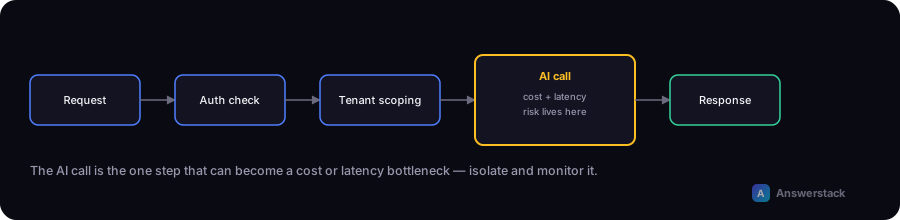
An AI-powered SaaS MVP needs the same core architecture as any SaaS product — authentication, multi-tenancy, billing — plus specific decisions about where and how AI calls fit into the request lifecycle without becoming a cost or latency bottleneck.
The core building blocks
Authentication
Every SaaS product needs to know who's making a request. For an MVP, use an established auth provider rather than building session management from scratch — it's a solved problem with real security implications for getting wrong.
Multi-tenancy
Decide early how customer data is isolated:
- Shared database, tenant ID column — simplest to build, requires discipline to scope every query by tenant ID.
- Schema-per-tenant — more isolation, more operational complexity.
- Database-per-tenant — strongest isolation, usually overkill for an early-stage MVP.
Most AI SaaS MVPs start with a shared database and a tenant_id (or organization_id) column enforced at the query layer.
Billing
Usage-based AI costs make metering more relevant than in typical SaaS. Decide upfront:
- Are you billing a flat subscription, usage-based, or hybrid (subscription + usage overage)?
- What are you metering — API calls, messages, tokens, seats?
- How will you track usage per tenant in a way that maps to your billing model?
Getting this wrong early is expensive to unwind once customers exist, so at minimum log usage per tenant from day one even if billing logic comes later.
Where AI calls fit in the request lifecycle
A common mistake is calling the AI model synchronously inside the main request path for anything that isn't near-instant. A more robust pattern:
Fast path (synchronous):
  Request → validate → check usage limits → respond

Slow path (async, for anything non-trivial):
  Request → enqueue job → respond immediately with a job ID
  Background worker → call AI model → store result
  Client → poll or subscribe for the result
For simple, fast operations (a short classification, a quick chatbot reply) synchronous is fine — this is the pattern used in How to Build an AI Chatbot. For anything that might take more than a few seconds (document processing, multi-step generation), use the async pattern so a slow AI call doesn't hold open a request or time out.
Usage limits and quotas
Because AI usage is a direct cost, enforce limits at the application layer, not just via billing after the fact:
async function checkUsageLimit(tenantId: string) {
  const usage = await getMonthlyUsage(tenantId);
  const plan = await getTenantPlan(tenantId);
  if (usage.requests >= plan.monthlyLimit) {
    throw new UsageLimitExceededError();
  }
}
Check this before making the AI call, not after — otherwise you've already incurred the cost of a request you were going to reject anyway.
A minimal MVP architecture
Next.js app (Vercel)
  → Auth provider (sessions/JWT)
  → API routes (see Building APIs for AI Applications)
      → Usage check → AI provider call → response
  → Database (tenant-scoped) for app data + usage logs
  → Billing provider webhook → sync plan/usage limits
This is enough structure to launch an MVP without over-engineering for scale you don't have yet — add queues, caching layers, and more sophisticated multi-tenancy only once real usage patterns justify it.