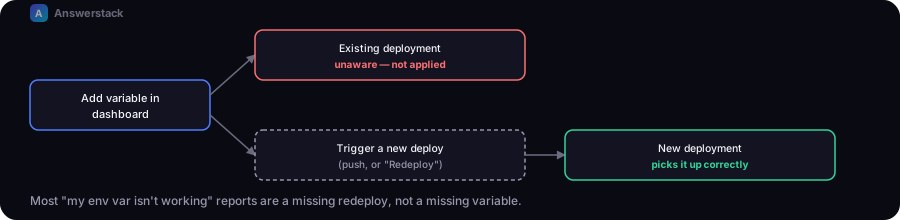
Environment variables in Vercel live in Project Settings, not your repo, and a variable added or changed there does not apply to deployments that already exist — only to the next one. Most "my env var isn't working" reports are actually a missing redeploy, not a missing variable.
Setting a variable correctly
- Go to your project in the Vercel dashboard → Settings → Environment Variables.
- Add the name and value, and choose which environments it applies to (Production, Preview, Development) — a variable scoped only to Production won't be available on preview deployments from pull requests.
- Save.
- Redeploy. This is the step that gets skipped. Adding a variable in the dashboard does not retroactively inject it into a deployment that already built and shipped — trigger a new deployment (push a commit, or use "Redeploy" on the latest deployment in the dashboard) for it to take effect.
The specific failure that looks like "it's not working" but isn't a missing variable
If your app returns a generic "not configured" error even after adding and redeploying, the variable might be present but wrong — not absent. Three real examples:
- Copied the wrong field from a third-party dashboard. Some services show a display name next to the actual ID you need — if a value has to be a specific format (a UUID, a key prefix), a name or label pasted into that field will fail validation at the API you're calling, not at Vercel.
- API key has a limited permission scope. Some providers issue keys scoped to one capability (e.g. sending only) that will authenticate fine but get rejected by a different operation (e.g. managing a contact list) with the same key. "Full access" on the key doesn't guarantee every field you pasted alongside it is correct — it just rules out permission as the cause.
- Trailing whitespace or quotes. Pasting a value that includes a stray space or quotation mark from where you copied it produces a variable that looks right in the dashboard's masked view but fails to match anything server-side.
How to actually debug it
- Check whether the error is "not configured" or a real API rejection. A well-built API route should distinguish these — "the variable is missing" and "the variable is present but the service rejected it" are different problems with different fixes. If your own code doesn't distinguish them, that's the first thing to fix.
- Temporarily log or return the actual error from the third-party SDK, not just your app's generic user-facing message. Most SDKs return a structured error object with a real reason (validation failure, permission denied, not found) — surface that during debugging, then remove it before leaving the endpoint in that state for real users.
- Confirm the redeploy actually happened after the variable change, by checking the deployment timestamp against when you saved the variable.
- Test the specific endpoint directly (via
curlor a REST client) rather than only through the UI — this isolates whether the problem is server-side configuration or a frontend issue.
A minimal example
POST /api/subscribe
{"email": "test@example.com"}

→ {"error": "Not configured"}         // variable is missing — check it was added and redeployed
→ {"error": "...", "debug": {...}}    // variable is present, but the service rejected the value —
                                       // read the debug detail, fix the value, remove the debug field