For most small businesses, the highest-ROI place to start with AI automation is a single repetitive, text-heavy task — like inbox triage, lead qualification, or first-draft customer replies — not a full department overhaul.
Why "start small" actually matters here
Small businesses don't have a dedicated automation team to fix a broken rollout. That means the biggest risk isn't "AI doesn't work" — it's picking a process that's too broad, too high-stakes, or too poorly documented to automate cleanly on the first try.
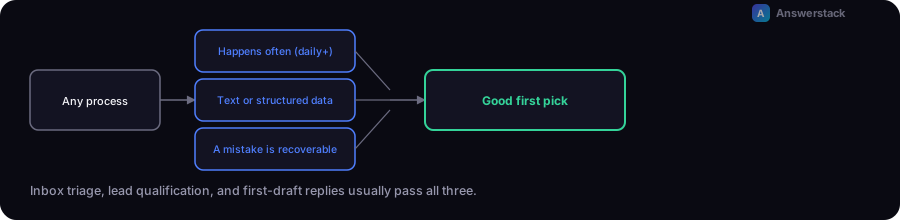
The processes that go well share three traits:
- They happen often (daily or more) — so the time saved compounds quickly.
- They're mostly text or structured data, not physical work.
- A mistake is recoverable, not catastrophic (a slightly-off email draft is fine; an incorrect refund approval is not).
Five starting points that work well
1. Inbox and lead triage
Have the system read incoming emails or form submissions, classify intent, extract key details (name, company, request type), and route or tag automatically. This alone often saves hours per week without touching anything customer-facing.
2. First-draft customer replies
AI drafts a reply based on your FAQ/knowledge base; a human reviews and sends. This cuts response-writing time dramatically while keeping a human as the final check — see How to Automate Customer Support.
3. Lead qualification
Score and route inbound leads based on form answers, company size signals, or chat conversation content, so sales only spends time on qualified leads. See How to Automate Lead Generation.
4. Meeting and call summaries
Auto-generate summaries and action items from sales or support calls, and push them into your CRM. Low risk, immediate time savings.
5. Content and reporting drafts
Weekly reports, social captions, or internal summaries drafted by AI from your raw data, reviewed by a human before anything goes out.
What it actually costs
Costs come from three places:
- Software/platform — many automation platforms (n8n, Make, Zapier) have usable free or low tiers to start.
- AI API usage — usage-based, typically fractions of a cent to a few cents per request depending on model and volume. Use the AI Automation ROI Calculator to estimate this against hours saved.
- Setup time — the real cost for most small businesses. Budget more time for mapping the process than for building it.
A simple rollout plan
- Pick one process using the criteria above.
- Write down the current manual steps exactly as they happen today — not the ideal version.
- Build the automation with a human-in-the-loop review step.
- Run it in parallel with the manual process for 1–2 weeks.
- Compare error rate and time saved before fully switching over.
- Only then consider a second process.
Mistakes to avoid
- Automating an undocumented process. If you can't write down the steps clearly, the AI can't either.
- Removing human review too early. Keep a review step until you have real accuracy data.
- Automating something customer-facing first. Start internal, move outward once you trust the system.
- Choosing the most expensive AI model by default. Many triage and classification tasks work fine on smaller, cheaper models.