AI automation is the use of artificial intelligence — usually machine learning models or large language models — inside an automated workflow so the system can handle variation, ambiguity, and decisions that a fixed, rules-based automation cannot.
That's the short answer. The rest of this guide explains what that means in practice, how it differs from traditional automation, and where it actually pays off.
The core idea
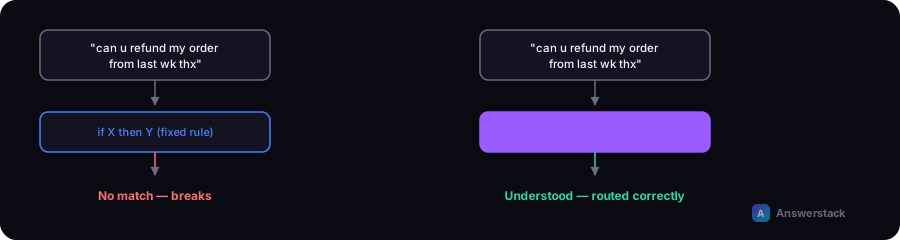
Traditional automation (think Zapier trigger → action, or a basic script) follows a fixed path: if X happens, do Y. It's fast and reliable, but it breaks the moment an input doesn't match what was expected — an oddly worded customer email, an invoice in a new format, a support ticket that doesn't fit any of your categories.
AI automation replaces or augments the rigid "if this, then that" logic with a model that can:
- Interpret unstructured input (emails, chat messages, PDFs, images)
- Classify or route based on meaning, not just keywords
- Generate a draft response, summary, or next action
- Make a judgment call within guardrails you define
In practice, most real-world AI automation systems are hybrid: deterministic steps (fetch data, update a record, send an email) wrapped around one or more AI steps (classify, summarize, draft, extract).
A concrete example
A traditional automation for handling support tickets might route "refund" tickets to one queue and everything else to another, based on a keyword match.
An AI-automated version:
- Reads the full ticket text
- Classifies intent (refund, bug report, how-to question, sales lead) even if the wording is indirect
- Extracts structured data (order number, product, sentiment)
- Drafts a reply using your knowledge base
- Routes to a human only if confidence is low or the issue is sensitive
The workflow steps (fetch ticket → classify → draft → route → notify) are still deterministic automation. The classification and drafting steps are where AI does work a rules engine can't.
What AI automation is not
- It is not a chatbot bolted onto a website. A chatbot is one interface; AI automation is the underlying system that can also run without any chat interface at all (e.g., processing invoices overnight).
- It is not "put AI on everything." Using an AI model for a step that a simple rule already handles well (like routing by email domain) usually adds cost and unpredictability for no benefit.
- It is not fully autonomous by default. Most production systems keep a human in the loop for high-stakes or low-confidence decisions — see AI Automation Mistakes for common failure modes.
Where AI automation pays off
AI automation tends to earn its cost when a process has:
| Characteristic | Traditional automation | AI automation |
|---|---|---|
| Fixed, predictable input format | ✅ Ideal | Unnecessary |
| Free-text or unstructured input | ❌ Breaks often | ✅ Ideal |
| Simple binary decision | ✅ Ideal | Overkill |
| Judgment call with context | ❌ Can't handle | ✅ Ideal |
| High volume, low variance | ✅ Cheapest option | Adds cost |
| High volume, high variance | ❌ Needs constant rule updates | ✅ Scales better |
How to start
- Map the process end to end before touching any tool — see How to Build an AI Business Workflow.
- Identify the one or two steps that genuinely require interpretation, not the whole process.
- Keep everything else deterministic. Don't route data through an AI model just because you can.
- Add a confidence threshold and human fallback for anything customer-facing or financial.
- Measure before and after — hours saved, error rate, response time — so you can prove ROI (use the AI Automation ROI Calculator).
Limitations to know upfront
- AI steps can be wrong confidently. Always validate high-stakes outputs.
- Costs scale with usage (API calls per run), unlike most rules-based automation.
- Non-deterministic output makes testing harder — you need to test for "reasonable range" of outputs, not exact matches.
Related reading
- AI Automation vs RPA: What's Actually Different?
- AI Automation for Customer Support: Beyond the Chatbot
- AI Automation for Sales: Where It Actually Helps
- ChatGPT vs Claude: Which One for Business Use?
- AI Automation ROI: How to Actually Calculate It
- AI Automation for Small Businesses
- AI Automation vs Traditional Automation
- AI Agents vs Automation