RPA (robotic process automation) scripts a fixed, rule-based sequence of interactions with existing software — click here, copy this field, paste there — and executes it exactly the same way every time. AI automation adds a reasoning layer that can handle unstructured input, classify intent, and make judgment calls within guardrails. They solve different problems and are frequently combined in the same workflow, not competing alternatives.
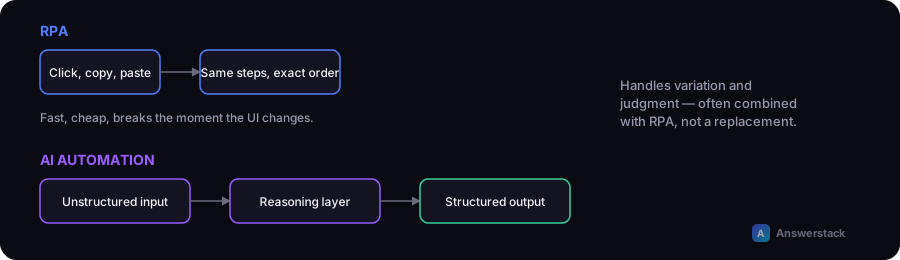
For the broader AI-agent-specific version of this same distinction, see AI Agents vs Automation.
The core distinction
| RPA | AI automation | |
|---|---|---|
| What it processes | Structured data, fixed UI interactions | Unstructured input — text, documents, natural language |
| How it decides | Fixed rules defined in advance | Classification/reasoning within a scoped task |
| Breaks when | The underlying UI or system changes | Rarely breaks from UI changes; can produce a wrong output on ambiguous input |
| Typical use | Data entry between systems, form-filling, legacy system integration | Reading and classifying a support ticket, drafting a reply, extracting meaning from a document |
| Setup approach | Record/script exact UI steps | Define input/output and let the model handle variation within that scope |
Why RPA breaks and AI automation doesn't (for different reasons)
RPA scripts are brittle to interface change — if a button moves or a legacy system's screen layout updates, a script built on exact coordinates or element paths can fail outright. AI automation is largely immune to that specific failure mode since it's not scripted against a UI, but it has a different failure mode: it can produce a plausible-sounding wrong answer on ambiguous or unusual input, which is why the same human-in-the-loop discipline covered in How to Build an AI Business Workflow matters more here than it does for RPA's simpler failure-or-succeed pattern.
Where they're commonly combined
A realistic production workflow often uses both: RPA moves structured data reliably between systems that don't have modern APIs (a legacy database, a UI-only vendor tool), while an AI step handles the part that actually requires understanding — classifying an incoming document, drafting a summary, deciding which of several structured paths to take next. Neither replaces the other; RPA handles the mechanical system-to-system movement, AI handles the judgment.
When to reach for which
- Use RPA when the task is genuinely structured and repetitive with no real judgment involved — copying data between two systems with no ambiguity in the mapping.
- Use AI automation when the input varies (customer messages, documents in different formats) or the task requires classification, summarization, or drafting.
- Use both together when a workflow has a structured-data-movement leg (RPA) and an understanding/judgment leg (AI) — a common real-world shape, not an edge case.
A common mistake
Assuming RPA is "old" and AI automation makes it obsolete. RPA remains the more reliable, cheaper, more predictable choice for genuinely structured, repetitive system interactions — replacing a working RPA script with an AI step for a task that has no real ambiguity just adds cost and unpredictability without benefit.