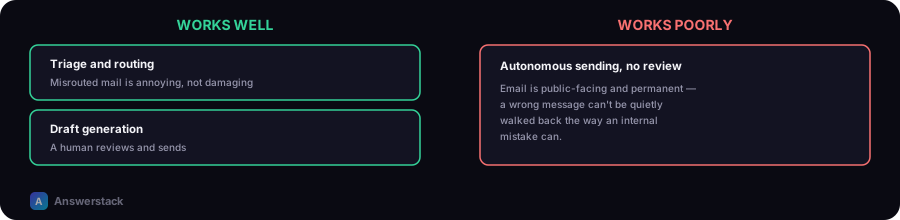
Email automation with AI works well for triage (classifying and routing incoming mail) and draft generation (writing a first-pass reply for a human to review and send). It works poorly, and often embarrassingly, when it's given autonomy to send emails on your behalf without review — email is public-facing, permanent once sent, and a single wrong message can't be quietly walked back the way an internal mistake can.
This applies the general workflow-design pattern from How to Build an AI Business Workflow to email specifically, where the stakes of a mistake are unusually high because the output is externally visible and immediate.
What actually automates well
Triage and routing
Classifying incoming email by intent (support question, sales inquiry, spam, urgent) and routing it to the right person or queue is a well-bounded, low-risk automation — a misrouted email is annoying but recoverable, not damaging.
Draft generation for human review
AI drafts a reply grounded in your knowledge base or past correspondence; a human reviews, edits if needed, and sends. This is the same human-in-the-loop pattern that works well for chatbot replies (see AI Chatbots for Customer Service) — the AI does the time-consuming first draft, the human retains judgment over what actually goes out.
Summarization and prioritization
Summarizing long threads or prioritizing an inbox by urgency/importance saves real time and carries low risk — a wrong priority ranking is annoying, not damaging, the way a wrong sent email is.
Where full autonomy goes wrong
- Tone and context mistakes that are hard to catch automatically — a technically correct reply that reads as cold, dismissive, or tone-deaf in context is a common AI failure mode that automated checks don't reliably catch.
- Committing to something the business can't actually deliver — an AI confidently promising a refund, a timeline, or a feature that isn't actually policy is a real liability once it's been sent to a customer.
- No graceful recovery — unlike an internal Slack message you can correct, a sent email is often the customer's permanent record of what was promised.
A practical automation boundary
| Email type | Automation level |
|---|---|
| Internal routing/triage | Fully automated — low stakes, easily corrected |
| Simple, templated responses (order confirmation, FAQ answer) | Automated send, if grounded in accurate, current information |
| Anything involving money, policy exceptions, or commitments | Draft only, human sends |
| Anything emotionally charged or from an upset customer | Draft only, human reviews tone specifically, not just accuracy |
A minimal rollout approach
- Start with triage/routing only — validate the classification is accurate before adding anything else.
- Add draft generation for your most common, well-documented reply types, with a human review step before sending.
- Track how often drafts are sent unedited vs. significantly rewritten — a high edit rate signals the draft quality or grounding needs work before expanding scope.
- Only consider automated sending for the narrowest, most templated, lowest-stakes message types — and even then, keep monitoring for drift as your policies or offerings change.