AI automation tooling generally splits into three layers: no-code/low-code automation platforms (orchestration), open-source workflow engines (orchestration you self-host), and model provider APIs (the AI capability itself). Most real systems combine at least two of these layers.
This is a category overview to help you understand what each layer does — not a ranked "best tools" list. Pricing and specific features change frequently; verify current details directly with each vendor before deciding, and see our editorial policy on how we evaluate tools we haven't directly tested.
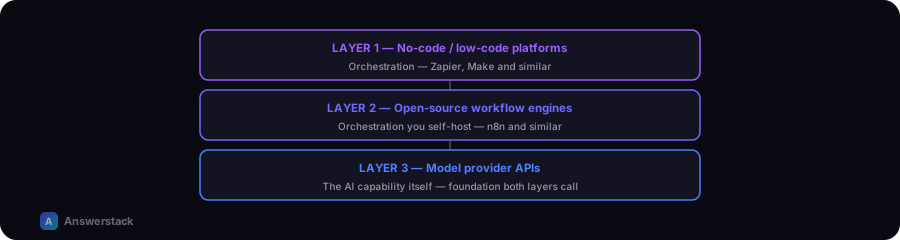
Layer 1: No-code / low-code automation platforms
These connect apps and services with visual, trigger-and-action workflows, often with AI steps built in as one action type among many.
- What they're good for: getting a workflow running fast without writing code; connecting to hundreds of common business tools out of the box.
- What to check: pricing model (often per-task or per-run, which can scale with volume), rate limits, and how much control you have over the AI step's prompt and behavior.
- Examples in this category: Zapier, Make, and similar visual automation platforms.
Layer 2: Open-source / self-hosted workflow engines
Similar orchestration concept, but you run the engine yourself (or via a hosted version of the open-source project), trading setup effort for more control and no per-task platform fee.
- What they're good for: teams with some technical capacity who want full control over logic, data handling, and cost — particularly at higher volume where per-task platform fees add up.
- What to check: hosting/maintenance burden, and whether your team has the capacity to manage updates and uptime.
- Examples in this category: n8n and comparable self-hostable workflow engines.
Layer 3: Model provider APIs
The underlying AI capability — text generation, classification, embeddings — accessed directly via API, either standalone or as the "AI step" inside a Layer 1 or Layer 2 workflow.
- What they're good for: custom-built systems (like a chatbot with a custom UI) where you need full control over prompts, context, and output handling — see How to Build an AI Chatbot.
- What to check: pricing (usage-based, per-token), rate limits, and data handling/retention policies if you're processing sensitive information.
- Examples in this category: the major AI model providers' APIs (OpenAI, Anthropic, Google, and others), typically accessed directly or via a unified API layer.
How to decide which layer(s) you need
| Situation | Likely fit |
|---|---|
| Need something running this week, low technical capacity | No-code platform (Layer 1) |
| Comfortable with some setup, want to avoid per-task fees at scale | Self-hosted workflow engine (Layer 2) |
| Building a custom product/interface (e.g. a branded chatbot) | Direct model API (Layer 3), often with a workflow engine underneath |
| Simple internal automation, low volume | No-code platform is usually the fastest, cheapest starting point |
A practical starting approach
- Start with a no-code platform for your first automation — it validates the process is worth automating before you invest in custom infrastructure.
- Move to a self-hosted engine or custom build only once volume, cost, or control requirements outgrow the no-code option.
- Re-evaluate the decision periodically — pricing and capabilities in this space change quickly.