For business use, the practical difference between ChatGPT and Gemini is less about which model is smarter and more about ecosystem fit: Gemini integrates directly into Google Workspace (Docs, Sheets, Gmail), while ChatGPT has the broader third-party integration and API ecosystem built up around it. The right choice often follows from what your team already uses daily, not a capability benchmark.
For the underlying decision framework, see Choosing an AI Model Provider API — this article is about the practical business-use angle specifically.
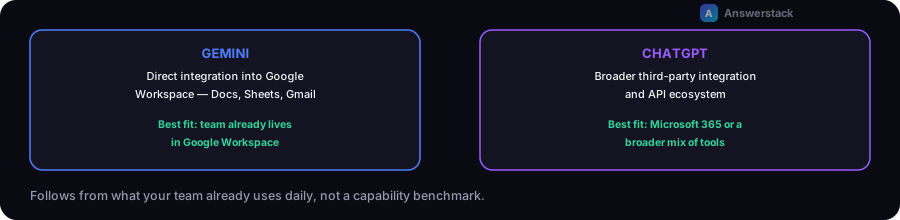
The ecosystem question matters more than it seems
If your team lives in Google Workspace, Gemini's direct integration into Docs, Sheets, and Gmail removes friction that a separate ChatGPT tab doesn't — drafting inside the document you're already editing, summarizing an email thread inline, generating from spreadsheet data without exporting it first. If your team is on Microsoft 365 or uses a broader mix of tools, this specific advantage doesn't apply, and the comparison should weight other factors more heavily.
Where to actually compare them
| Factor | What to check |
|---|---|
| Where your team already works | Google Workspace-heavy teams get real friction reduction from Gemini's native integration |
| API/integration needs | Compare actual API pricing, rate limits, and latency at your volume — see Building APIs for AI Applications |
| Multimodal tasks (images, documents) | Test both against your actual document types and formats — capability here varies and changes with model updates |
| Existing tooling built on top | A large ecosystem of third-party tools and integrations has been built around ChatGPT/OpenAI's API — check whether a tool you already want to use only supports one provider |
Don't decide based on a single demo
Both providers ship frequent model updates, and a comparison based on a single test months ago may not reflect current capability. If a specific task matters enough to base a decision on, test it fresh with both current models rather than relying on an old impression or a benchmark you read once.
A practical decision approach
- Check where your team already works — if Workspace integration removes real daily friction, that's a concrete, ongoing advantage, not a marginal one.
- Test your specific task type against both — document drafting, data analysis, coding, whatever your actual use case is — rather than trusting a general capability ranking.
- If you're integrating via API, compare actual cost and latency at your volume using the AI Automation ROI Calculator rather than list pricing alone.
- Revisit periodically — this is not a permanent decision, especially given how frequently both providers update their models.