Technical SEO covers everything that determines whether search engines can find, crawl, render, and index your pages correctly — independent of how good your content is. Get this wrong and great content never gets the chance to rank.
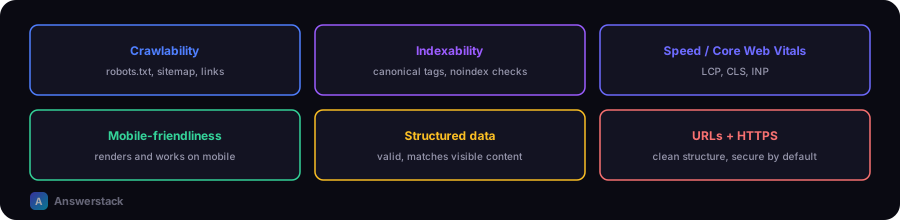
Crawlability
Search engines discover pages by following links and reading your sitemap. Check:
- robots.txt doesn't accidentally block important pages (use the Robots.txt Generator to build a correct one).
- XML sitemap exists, is submitted in Search Console, and only lists real, indexable pages.
- Internal links connect every important page — orphan pages with no internal links are much harder to discover and rank.
- No crawl traps — infinite pagination, faceted navigation generating endless URL combinations, or session IDs in URLs.
Indexability
A page can be crawled but still excluded from the index. Common causes:
noindexmeta tag left on accidentally (common after a staging site goes live)- Canonical tag pointing to a different URL, telling search engines "index that one instead"
- Duplicate or near-duplicate content competing with another page on your own site
- Thin content that doesn't meet a reasonable quality bar
Site speed and Core Web Vitals
Page experience factors that Google measures directly:
| Metric | What it measures | Good threshold |
|---|---|---|
| LCP (Largest Contentful Paint) | How fast the main content loads | Under 2.5s |
| INP (Interaction to Next Paint) | Responsiveness to user interaction | Under 200ms |
| CLS (Cumulative Layout Shift) | Visual stability while loading | Under 0.1 |
Next.js on Vercel handles a large share of this automatically (image optimization, code splitting, edge caching), but bloated JavaScript, unoptimized images, and render-blocking scripts can still hurt you — see Core Web Vitals Explained and Next.js SEO Best Practices.
Mobile-friendliness
Google indexes the mobile version of your site by default. Test that:
- Text is readable without zooming
- Tap targets (buttons, links) aren't too small or close together
- Content doesn't overflow the viewport horizontally
Structured data
Schema markup (JSON-LD) helps search engines understand what a page represents — an article, a product, a FAQ. Use it only where it accurately reflects visible page content; fabricated structured data (fake ratings, fake FAQs) risks manual penalties and misleads users. See Entity SEO Explained for how this connects to AI search.
URL structure
- Use clean, descriptive, lowercase URLs (
/seo/technical-seo/core-web-vitals, not/p?id=4821) - Keep URLs stable — changing them without redirects loses ranking history
- Use hyphens, not underscores, to separate words
HTTPS and security
HTTPS is a baseline requirement, not a bonus — sites without it are flagged as "not secure" in browsers and treated as lower quality.
A practical technical SEO check
- Run your site through Google Search Console's URL Inspection tool on a few key pages
- Check the Coverage/Indexing report for pages excluded unexpectedly
- Check Core Web Vitals report for pages failing thresholds
- Confirm sitemap.xml and robots.txt are both valid and accessible
- Spot-check that important pages are actually reachable via internal links, not just the sitemap
For a fuller recurring process, see the SEO Audit Checklist.